How do I get the free version of BarTender?
Run the latest version of the Eddie Installer or LX Series Installer to receive instructions for download and a free coupon code. (If you already have the code, you can skip to step 2).
1. The following screen will be displayed Before the registration screen. (You can rerun the
installer to get to it even after all other software has been installed). 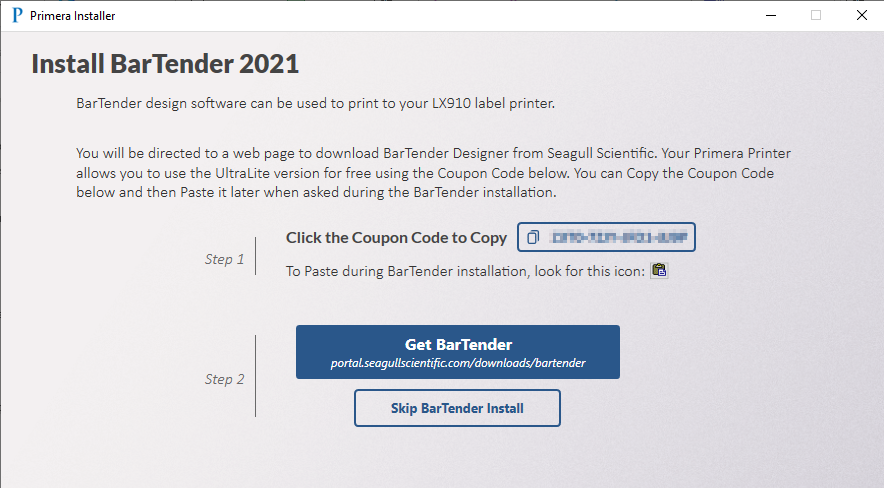
3. Download BarTender 2022. While the code usually works for newer versions it was designed for the 2022 version. Do not download the latest version. Instead click on Other versions and options. Choose Global: BarTender 2022 R8
If you have trouble activating you may have an older version that needs to be deactivated first using these instructions.
This is what you will see in the Help Menu - About when installed correctly.
Note: There is only one
download of all BarTender editions. This download includes all possible
features. The code that the you enter determines what parts of BarTender are unlocked. The code Primera provides unlocks a special suite of features called “BarTender Designer
for Primera Ultralite Edition”
Article ID: 011221
Related Articles
Poor Print Quality, Blurry Printing, Print Smearing, faded prints, or splotchy prints on my Cookie or Food Item. (Eddie)
1. Clean the Cartridge. Follow the procedures in this article to clean the cartridge. However, instead of using alcohol to clean the cartridge, use distilled or bottled water. Tip! Leave the printer powered on when it is not in use to maintain ...How to print Red with Eddie Edible Ink Printer.
If your Eddie is printing red that looks more orange, use these tips to get the best possible red. White Frosting/Icing. The color of the printing surface makes a huge difference to the quality and color accuracy of the print. The "whiter" the white, ...How do I use my DTM Manual Feed Trays with the Eddie?
If you purchased manual plastic feed tray templates for your Eddie from DTM Print in Germany please visit the link below. You will need to download BarTender or NiceLabel Templates to use them. Also, watch the video for instructions. ...How do I deactivate BarTender so I can activate the free Ultralite Primera version?
Open BarTender. Go to the Help Menu. Choose "BarTender Licensing Wizard". Choose "Deactivate BarTender Suite". Choose "Deactivate and remove the Product Key Code from this computer". Click Next. Click Finish when you see the Deactivation Successful ...Error Message: Remove Cookie/Cookie was left in the printer after power up. However, there is no cookie/custom tray present on the platform. (Eddie)
If you receive this error after powering up Eddie, follow the steps below. If you receive this error in the middle of printing, it probably means that Eddie needed to restart for some reason, and since it was in the middle of printing when it ...